Completed Event: Baseball versus (3) Georgia on June 15, 2026 , Win , 4, to, 3
Final

Baseball
4
vs (3) Georgia
3



HOW TO WATCH OKLAHOMA VS. SMU ON ESPN+
Can’t make it to The Palace for Saturday’s Oklahoma vs. SMU football game? Gather your friends and family and watch it LIVE on SoonerVision on ESPN+ via your streaming device.
Fans who already have an ESPN+ subscription will be able to watch the game at no additional fee.
To find the game on the ESPN App, fans have a few different options.
SOONERVISION CHANNEL ON ESPN+
On the ESPN App scroll down to “Channels” and click on the SoonerVision Channel. Then select the Oklahoma vs. SMU thumbnail. Or click here to be taken to SoonerVision on ESPN+

SEARCH FOR THE GAME ON WATCH ESPN
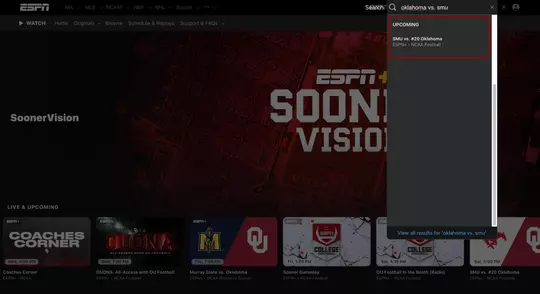
On the ESPN App search Oklahoma vs. SMU and click on the drop down
ESPN SCHEDULE & REPLAY
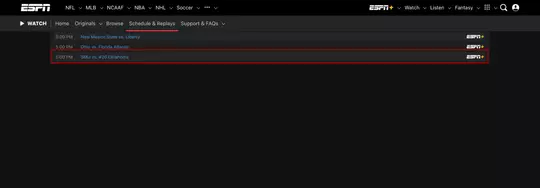
On the ESPN App click the Schedule & Replays tab at the top then follow the steps below:
1. Select “Upcoming” -> Football -> ESPN+
2. Pick SAT SEP 9 -> NCAA Football
3. Scroll down to the 5:00 PM time slot
4. Select SMU vs. #20 Oklahoma
ESPN+ FAQ
+ Apple TV
+ iPhone/iPad
+ Android
+ Roku
+ Chromecast
+ Amazon FireTV
+ Xbox Consoles (X/S, One)
+ Playstation Consoles (PS4, PS5)
+ Tizen Devices
+ ESPN.com, ESPNplus.com or on the ESPN App (mobile and connected devices)
Click here for ESPN+ streaming instructions
NEW ESPN+ SUBSCRIPTIONS
Fans sign up to ESPN+ for just $9.99 a month (or $99.99 per year) at ESPN.com, ESPNplus.com or on the ESPN App (mobile and connected devices). It is also available as part of the Disney Bundle that gives subscribers access to Disney+, ESPN+ and Hulu for $13.99/month (Hulu w/ads) or $19.99/month (Hulu w/o ads). Subscribers to Hulu + Live TV also receive ESPN+ at no additional cost.
On ESPNPlus.com:
1. Visit espnplus.com and click 'Sign Up Now'
2. Create your ESPN+ account and click 'Sign Up' at the bottom of the form
3. Select a Monthly ($6.99/mo) or Yearly Plan ($69.99/yr)
4. Enter your payment information & submit
5. Start watching!
On ESPN App:
1. Open the ESPN app, or install from your device app store
2. Navigate to the ESPN+ tab within the app and hit 'Subscribe Now'
3. On the sign-up page click 'Subscribe Now' again
4. Hit confirm on app-store pop-up (payment will be connected through device app store)
5. Start watching!
Yes! Bundle subscribers can get the full ESPN+ experience, the best stories in the world
with Disney+, and your favorite TV episodes from Hulu (ad-supported) all for just $13.99/month.
No, both products live within the same app but are authenticated differently. Events that appear on ESPN's linear channels (ABC, ESPN, ESPN2, ESPNU, ESPNews) and ESPN3 require TV Everywhere credentials to watch.
ESPN+ does not require a cable subscription or long-term contract. Fans sign up to ESPN+ for just $9.99 a month (or $99.99 per year) at ESPN.com, ESPNplus.com or on the ESPN App (mobile and connected devices). It is also available as part of The Disney Bundle that gives subscribers access to Disney+, ESPN+ and Hulu for $13.99/month (Hulu w/ads) or $19.99/month (Hulu w/o ads). Subscribers to Hulu + Live TV also receive ESPN+ at no additional cost. Fans can subscribe and start streaming instantly on connected TVs, tablets, laptops, phones, or other supported devices. ESPN's linear channels (ABC, ESPN, ESPN2, ESPNU, ESPNews) and ESPN3 still require TV Everywhere credentials (cable authentication) to watch.
ESPN+ is not available outside of the U.S. at this time.
Yes, you can access three streams from ESPN+ at any one time.
Fans can contact ESPN+ Customer Care with any questions:
+ Online: support.espn.com
+ Phone: 1-800-727-1800
+ Chat: support.espn.com
+ Email: support@espnplus.com
+ ESPN+ Customer Support Available: 9am to 1am ET, 7 days a week


